A buffer percentage is a way to expose extra time, not a guarantee that a travel day will remain on schedule. A delay concentrated around one critical departure can matter more than the same number of minutes spread across the day. The itinerary tool adds a percentage to visits, travel and breaks. This guide explains how to compare that reserve with your actual uncertainty and when a fixed commitment needs a separate planning check.
Read buffer minutes rather than percent alone
A 20% buffer on a two-hour base adds twenty-four minutes. On an eight-hour base it adds ninety-six. The percentage feels identical, but the practical margin is very different. Read the reserve output and compare it with the delays you are considering. A queue, a missed local connection or an extra walk to the entrance may each consume a meaningful part of the reserve. The tool does not estimate the probability of those events. It shows how much additional time the selected arithmetic allows across the plan.
Separate ordinary variability from fixed departure needs
A booked train, flight or tour has its own arrival and preparation requirements. Those requirements belong in the plan as known time, using the provider's guidance where relevant. Do not place them inside a generic percentage buffer and hope the buffer will cover them. The pace calculator evaluates an aggregate time window; it does not understand deadlines at specific moments. Plan backward from the fixed departure and check the latest point when sightseeing must end. Then use a buffer for the remaining uncertainty within the flexible part of the day.
For the next input check, use Itinerary Pace Calculator. Its result should retain the assumptions described here.
Test a named delay scenario
Choose a plausible scenario and increase the relevant transfer or waiting estimate. Compare the new total with the original available window. If the plan fails, decide which stop can be dropped and whether that drop happens before the critical commitment. A fallback attraction at the end of the day cannot rescue a morning missed departure. Writing the fallback in chronological terms makes it actionable. This method is stronger than selecting a larger percentage without specifying where the extra time may be needed or what will happen if it is used.
Keep a flexible stop genuinely optional
An optional stop is useful only when the group is willing to omit it. Label it clearly and avoid prepaying or promising it as a core part of the day unless the plan can support it. If the buffer remains unused, the stop may fit; if not, skipping it preserves the rest of the itinerary. Do not let every attractive addition consume the reserve before the day starts. A schedule with all spare time assigned to optional activities has little resilience if those activities become expectations rather than choices.
A related planning question is covered in Building a day itinerary as a time budget.
Where to put the fallback decision
Choose a point in the day when you will decide whether to keep the optional stop. That decision should occur early enough to protect the next fixed commitment. For example, after the second visit you can compare the current local time with the latest comfortable departure for a booked afternoon tour. If you are already near that boundary, omit the optional visit immediately rather than trying it and hoping the transfer is fast. The tool's remaining-minute output can help set a broad margin, but it does not monitor progress or send alerts. Put the decision rule in the itinerary note using the actual clock sequence. A fallback that depends on recognizing the problem only after the deadline is not operationally useful. This is especially relevant on travel days, when luggage collection or terminal access can vary. Keep the known provider requirements in the base plan and make the optional activity the adjustable part, so ordinary uncertainty does not consume time reserved for a fixed departure.
Worked example
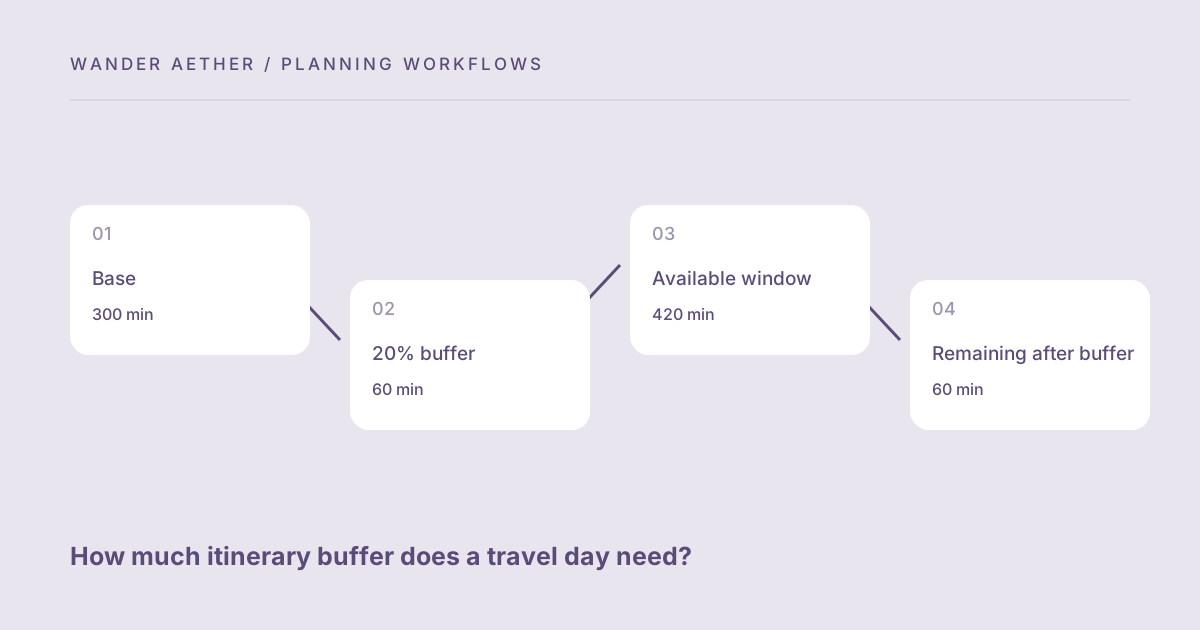
Worked example: A base itinerary requires 300 minutes in a seven-hour window of 420 minutes. A 20% buffer adds 60, giving a planned total of 360 and sixty minutes remaining. The traveler tests an additional thirty-minute transfer delay, and the day still fits numerically. But a fixed tour starts halfway through the day, so she checks the morning sequence separately. The extra delay before that tour could still cause a conflict even though the whole-day total is below capacity. She moves one flexible visit after the tour and records it as optional if the morning runs late.
Reference table
| Item or scenario | Value or choice | What to remember |
|---|---|---|
| Base | 300 min | Known planned activity |
| 20% buffer | 60 min | Uncertainty allowance |
| Available window | 420 min | Seven usable hours |
| Remaining after buffer | 60 min | Capacity, not a deadline guarantee |
| Fixed event | Check separately | Location of delay matters |
Before you finish
- Read the buffer as minutes and name what it covers.
- Put known check-in and preparation requirements in the base.
- Test a specific delay in the relevant part of the day.
- Plan backward from fixed departures or booked starts.
- Keep a clearly agreed optional stop available to remove.
Your next step
Use both the total time budget and a chronological schedule. The aggregate tool catches an overloaded day, while the clock sequence catches a badly placed delay. The two checks complement each other and should remain distinct when you share the plan with other travelers.
Continue with Planning a sightseeing day for a mixed-pace group. When your plan needs the next calculation, open Travel Time Zone Converter and carry over only the inputs appropriate to that tool.